Reading a registered COA: a worked MS10 example
Follow one four-page MOTS-C report from its complete SKU and dates to its result table, supporting pages and stated limitations.
A DOCUMENT, KEPT WITH ITS RECORD
One report. One complete SKU.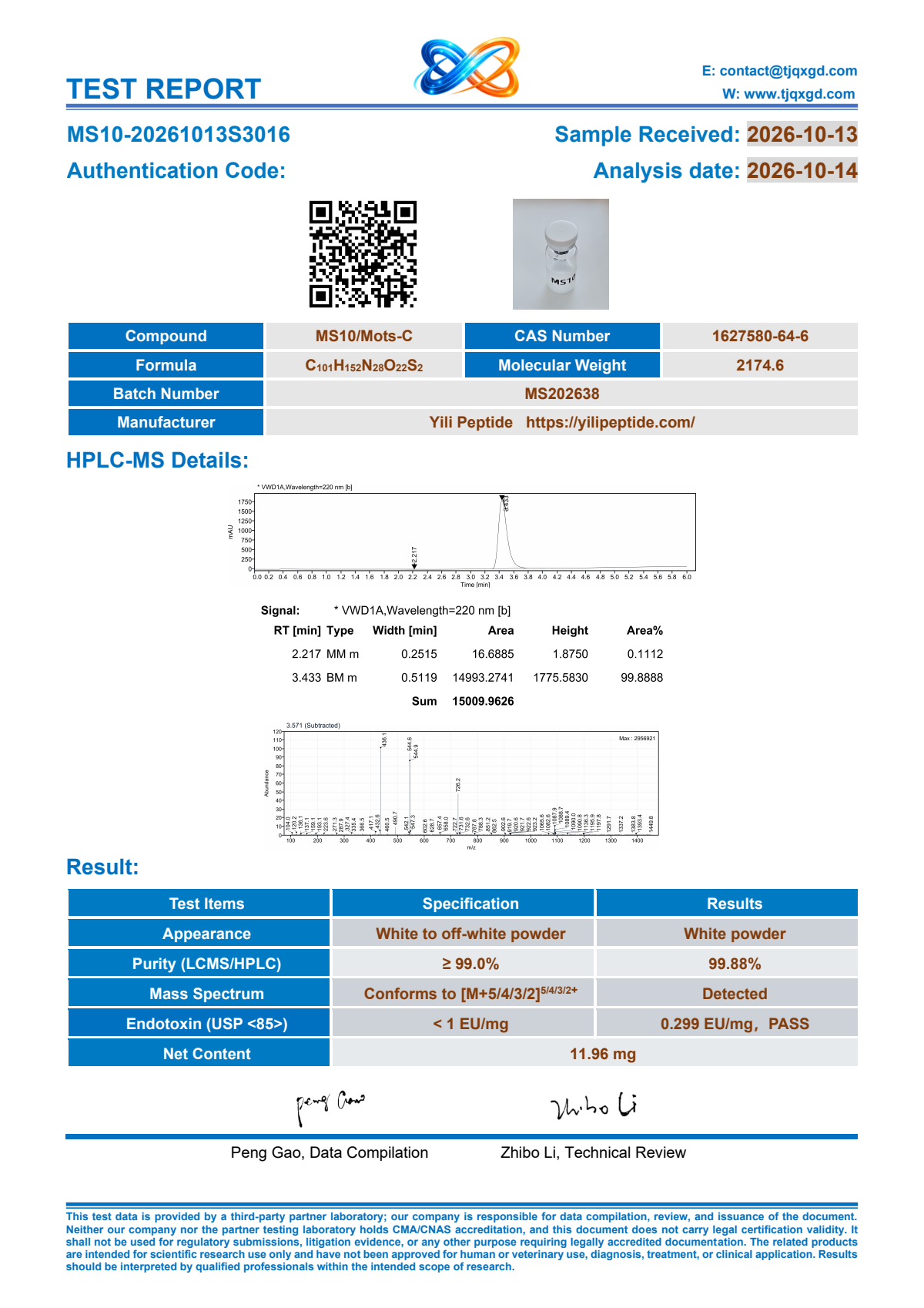
REPORT IDENTIFIER
MS10-20261013S3016The identifier stays attached to the report PDF and the sample it describes.
CATALOG MATCH
MOTS-C · MS1010 mg per vial
10 vials per box
TWO DIFFERENT DOCUMENT POSITIONS
- MS10
- Report PDF registered
- MS20
- No PDF registered; confirm documents
One specification’s report does not cover the other.
01
Start with one record, not a product-family claim
A useful document review begins with a precise question: which catalog specification does this file accompany, and what does the file actually say? For this worked example, the Yabang record is MS10, MOTS-C, 10 mg per vial, 10 vials per box. The registered file is MS10-20261013S3016_report.pdf. Its four pages should travel together when a reseller shares the record with a colleague.
The first page is a summary; the following three pages contain supporting instrument output. Reading the preview alone can hide differences between a catalog specification, a reported measurement and a signal-specific value. Keep the original open while reviewing the fields below. The figures describe this document's sample record and do not establish the contents of every future shipment.
02
Separate the catalog identifier from the sample identifiers
| Field | Recorded value | How to use it |
|---|---|---|
| Catalog SKU | MS10 | Use this complete code in the inquiry and product link. |
| Catalog content | 10 mg per vial | Keep the requested specification as listed in the catalog. |
| Report identifier | MS10-20261013S3016 | Retain the full document identifier with the file. |
| Compound field | MS10/Mots-C | Read the original wording alongside the catalog name. |
| Batch number in report | MS202638 | Ask the team whether this record is relevant to the proposed supply. |
| Sample received | 2026-10-13 | This is a sample event, not an order or dispatch date. |
| Analysis date | 2026-10-14 | This dates the reported analysis, not every future batch. |
The batch number and report identifier serve different purposes. Keeping both avoids losing the relationship when a PDF is renamed in a reseller's files. A matching product name is a useful starting point, but the proposed supply still needs confirmation against the complete SKU and available documentation.
03
Read each result with its own label and unit
On page one, the result table records Purity (LCMS/HPLC) as 99.88%, Net Content as 11.96 mg, Mass Spectrum as Detected, and the endotoxin result as 0.299 EU/mg, PASS. These are separate fields. The percentage is not the mass in a vial; the mass result is not the catalog specification; and PASS is attached to the particular row and criterion printed in the report.
The catalog request remains MS10 at 10 mg per vial. Do not silently replace that specification with 11.96 mg in a quotation line, product title or vial label. If the difference between the nominal specification and this reported measurement matters to your purchasing review, ask the team to explain the documentation relevant to the proposed supply. Preserve the question rather than rewriting either source.
04
Check the supporting pages before copying a percentage
The detailed table on PDF page three labels its results by signal. The 220 nm row shows a principal area percentage of 99.8888, while the 254 nm row shows 99.7693. The positive and negative TIC tables each show 100.0000 for their listed peak. Those numbers occupy different labeled tables; selecting the largest number and presenting it as a general purity promise would discard the document's context.
This guide transcribes the report's fields rather than independently interpreting or validating the analytical method. For a technical assessment, provide the entire PDF and the intended document requirement to a qualified reviewer. A screenshot of one plot, or an isolated 100% entry, is an incomplete handoff.
05
Keep the report limitations attached
The first-page footer states that a partner laboratory supplied test data and that the issuing company compiled and reviewed the document. It also states that neither holds CMA/CNAS accreditation, that the document has no legal certification validity, and that it is not for regulatory submissions or other purposes requiring legally accredited documentation. These statements are part of the file, not optional small print to remove when forwarding it.
The report also limits the related products to scientific research use. Its named company, signatories and sample details belong to the report document. They are not evidence that Yabang has independent manufacturing certification, accreditation, or an inspection of the particular order under discussion.
06
Turn the review into a specific document request
A practical follow-up names MS10, the requested number of boxes, the report identifier and the point still needing confirmation: for example, relevance of batch MS202638 to the proposed supply. If you are comparing MS20, use its own product record and ask about its documents. The presence of an MS10 file does not cover MS20.
Open the COA library for exact-SKU coverage, then send an MS10 document inquiry. For a different specification, first use the per-vial comparison guide so the document request and quotation line identify the same item.
CHECK THE UNDERLYING RECORD
Documents and sources
- MS10 original four-page registered report
- MS10 catalog specification and document panel
- Exact-SKU COA library
Catalog and route examples reviewed on 20 November 2026. Confirm the information relevant to the proposed supply with the team.
PUT THE REVIEW INTO A REQUEST
Send the record with your question.
Include the complete SKU, requested boxes, destination and the document or timing point you need confirmed.
Discuss this purchasing record →RETURN TO THE SOURCE SPECIFICATION